
AI Insights: AI for Accessibility — Making Tech Inclusive
Introduction
Technology has always promised to remove barriers, but for millions of people with disabilities, access to digital systems has often depended on assistive devices, specialized software, or human support. Artificial intelligence is changing that. Rather than being an optional layer on top of technology, accessibility is increasingly becoming built-in, automated, and intelligent.
AI is enabling experiences that were not previously possible — real-time captioning, text-to-speech and speech-to-text conversions, gesture recognition, visual scene understanding, adaptive interfaces, and personalized accessibility settings. Instead of forcing individuals to adapt to technology, AI is helping technology adapt to individuals.
Accessibility is not only about compliance. It is about enabling participation, independence, and inclusion at scale. AI makes this vision practical.
Why AI Matters for Accessibility
Traditional accessibility tools rely on predefined rules: fixed captions, preset keyboard shortcuts, or static screen readers. AI expands these capabilities by understanding context, intent, and environment.
AI matters because:
- Accessibility needs vary widely from person to person.
- Manual accessibility configurations cannot scale to every situation.
- Real-time interpretation requires automated intelligence.
- Inclusive design benefits everyone, not just users with disabilities.
AI bridges the gap between diverse human needs and digital experiences.
How AI Improves Accessibility in Practice
AI systems interpret speech, images, gestures, and patterns in ways that reduce the burden on users. Modern applications integrate these capabilities directly into everyday workflows.
Steps in an AI-Assisted Accessibility Workflow
-
Detect User Needs or Context
Systems recognize when a user may benefit from captions, magnification, or alternative input modes.
-
Translate or Interpret Input
Speech, text, and visual information are converted into accessible forms — captions, audio descriptions, sign language avatars, or simplified text.
-
Adapt Interface Automatically
Apps adjust layout, text size, contrast, or navigation pathways without requiring manual configuration.
-
Provide Real-Time Assistance
Users receive audio cues, on-screen guidance, or AI-generated explanations for visual scenes or documents.
-
Personalize Over Time
AI learns user preferences, providing consistent accessibility behavior across apps and devices.
These steps transform accessibility from a static feature into a continuously responsive system.
Key Areas Where AI Drives Accessibility
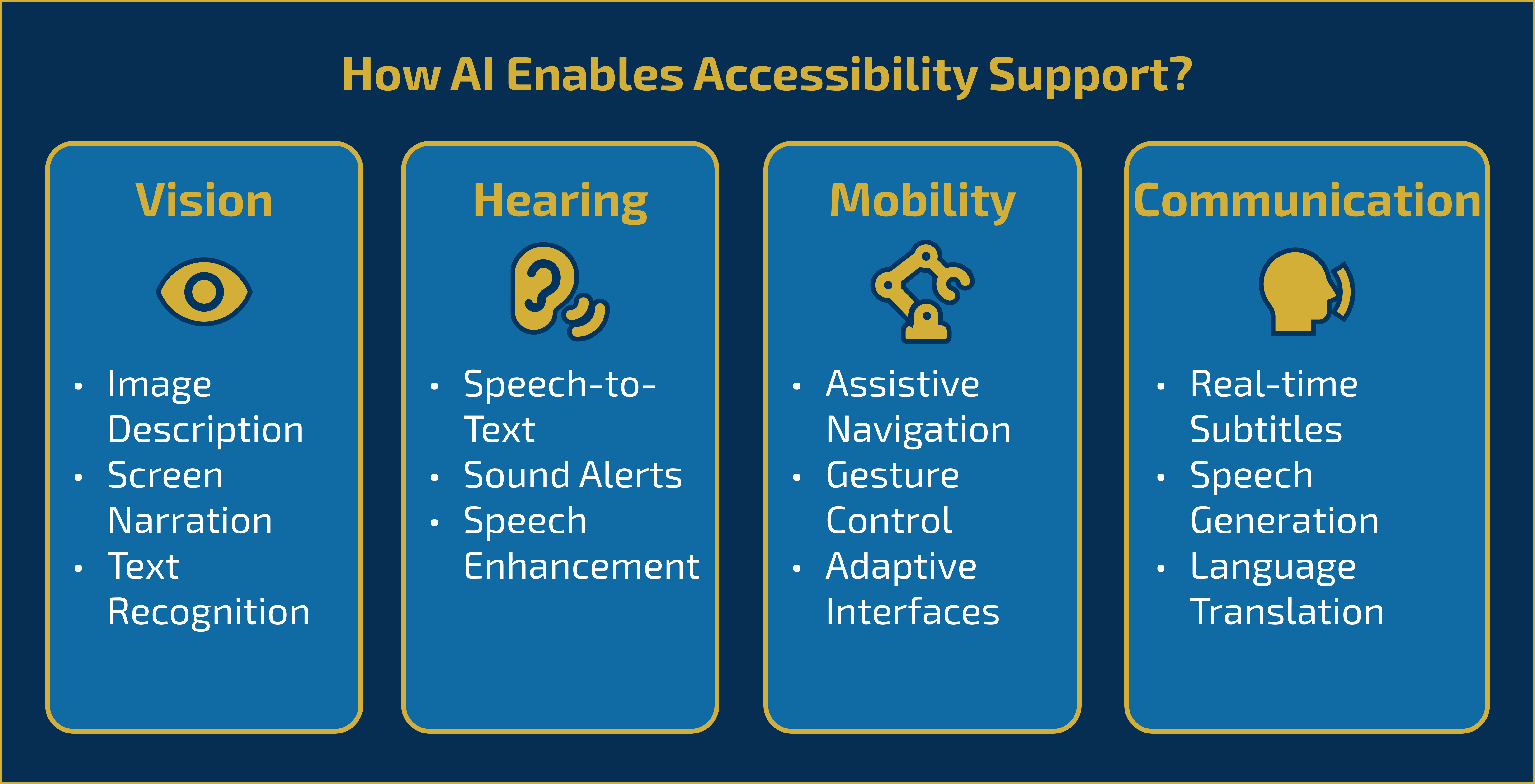
Figure: AI-powered accessibility capabilities across different need categories.
Vision Assistance
AI models describe images, identify objects, read text aloud (OCR), guide navigation, and enhance visibility through contrast adjustments.
Hearing Assistance
Speech-to-text systems, live transcription, ambient noise filtering, and AI-driven captioning support people with partial or full hearing loss.
Mobility & Motor Support
Gesture control, voice commands, predictive text, eye-tracking interfaces, and adaptive keyboards help users who cannot rely on traditional input devices.
Cognitive Support
AI simplifies interfaces, summarizes complex content, provides reminders, detects patterns of confusion, and offers step-by-step guided experiences.
Communication Support
Translation tools, sentiment recognition, and alternative communication interfaces help people communicate more freely across languages and disabilities.
These advancements enable independence and broaden participation across digital platforms.
Best Practices for Building AI-Driven Accessible Systems
- Design accessibility as a core requirement, not an afterthought.
- Provide multiple input and output modes (voice, text, touch, gesture).
- Train models with diverse data to avoid bias and exclusion.
- Allow manual overrides so users can control adaptive behavior.
- Validate AI-generated captions, summaries, and descriptions for accuracy.
- Maintain privacy — accessibility features often process sensitive user input.
- Test with real users across diverse disability groups.
- Ensure accessibility persists across platforms and devices.
AI can enhance accessibility only when combined with strong design practices.
Conclusion
AI is reshaping accessibility by making technology adaptive, responsive, and context-aware. The shift from assistive tools to intelligent systems enables experiences that empower individuals rather than constrain them. When AI is used responsibly, it expands what people can do — not only by reducing barriers but by enabling opportunities that were previously unreachable.
Inclusive technology is not optional. It is a responsibility and an advantage. AI helps organizations move beyond compliance and toward meaningful accessibility that respects the diverse ways people interact with the world.
Key Takeaways
- AI improves accessibility through real-time interpretation and adaptive interfaces.
- Vision, hearing, mobility, cognitive, and communication support benefit from intelligent systems.
- Best practices ensure systems remain inclusive, accurate, and private.
- AI-driven accessibility expands independence and participation for all users.
- Inclusion becomes a practical reality when technology adapts to human needs.
References
Comments
Add Your Comment
Related Posts

AI Insights: When NOT to Use Generative AI in Enterprise Systems
0 5
AI in Production: AI Observability — Monitoring Models, Prompts, and Drift
0 19
AI in Production: AI Failures in Production — What Went Wrong
0 30
7-Day AI Crash Course
Learn how AI works, explore real-world examples, and build your first smart models step-by-step.
Perfect for beginners, students, and tech enthusiasts ready to start their AI journey.
No comments yet. Be the first to comment!